Samsung Galaxy S3 Android 4.2.2 firmware leaked with Galaxy S4 features

15 Comments

Samsung Galaxy S3 Android 4.2.2 firmware leaked with Galaxy S4 features
 Lock awning widgets, re-vamped settings, active approach and more

Samsung has a clue almanac of bringing key software appearance to earlier phones with above firmware upgrades, and it seems aftermost year's Galaxy S3 is about to see such an amend forth with Android 4.2.2. Leaked firmware acquired by SamMobile brings the all-embracing Galaxy S3 -- the quad-core Exynos-powered GT-i9300 -- up to Android 4.2.2, and adds abounding appearance ahead aloof for the Galaxy S4.

New appearance accommodate a accustomed arrangement of lock awning widgets and alleviate effects, new affectation modes, a re-tooled quick settings breadth in the notification pull-down, a new active approach and an adapted adaptation of the S Voice abettor app. Some of the banderole Galaxy S4 appearance like "Air view" hover-touch abilities aren't included -- that's because they're abased on the S4's centralized hardware.

SamMobile has appear the new -- and actual abundant pre-release -- firmware adaptation I9300XXUFME3 online, and it comes with all the accepted warnings associated with application amateurish software on your phone. In addition, it'll access your bifold adverse (the difficult-to-reset adverse cogent you how abounding actionable ROMs you've installed) by one, alike admitting it's apparent as an official Samsung firmware.

If you demand to alive dangerously, you can acquisition the download and accession capacity over at the antecedent link. If not, you'll acquisition video afterwards the break.

Source: SamMobile
Read more

Galaxy Tab S up for pre-order in the UK, prices start at £330

0 Comments

Galaxy Tab S up for pre-order in the UK, prices start at £330

Aside from an official Samsung sign-up page, we haven't heard a accomplished lot about back and area British consumers will be able to get authority of Samsung's new high-res, SuperAMOLED-toting Galaxy Tab S tablets. But today both Tabs accept gone up for pre-order at Currys PC World, with prices starting at £329.99 for the 8.4-inch Tab and ascent to £419.99 for the 10.5-incher. That's hardly added than Apple's Retina iPad Mini (£319) and iPad Air (£399), but cheaper than Samsung's beforehand Galaxy Tab Pro slates.

PC World's online abundance suggests both Tabs will activate aircraft July 4, and advice anesthetized our way from a adviser reveals that the Tab S alternation will be accessible in-store the afterward day, July 5. Over in the U.S., the new tablets are accessible to pre-order now advanced of retail availability after this month.

Source: PC World
Read more

Moto X on US Cellular now receiving Android 4.4.2 update

0 Comments
Moto X on US Cellular now receiving Android 4.4.2 update
Document printing, array activity and email accompany all bigger in latest update

As Android 4.4.2 updates for altered variants of the Moto X abide to cycle out, U.S. Cellular is abutting on the list. Posting on its abutment pages, Motorola has accepted that the amend is on its way to users now, bringing with it a few quick fixes that you'd apprehend in a baby point release:

    Press abstracts and pictures: Added abutment for press photos, Google Docs, GMail messages, and added agreeable via Wi-Fi, Bluetooth and hosted casework like Google Cloud Print and HP ePrinters.
    Bigger array life: Fixed bugs which acquired a baby cardinal of users to acquaintance beneath array activity afterwards advance to Android 4.4.
    Fixed email accompany delays: Fixed a bug that could account email casework like Microsoft Exchange to acquaintance alternate delays in abstracts synchronization.

If you've got a Moto X active on U.S. Cellular you can apprehend to see an amend notification in the abreast approaching — afterwards commutual the update, your software adaptation will be 161.44.27.

Source: Motorola


Read more

HP launches the bezel-heavy 7 Plus for $99

0 Comments
HP launches the bezel-heavy 7 Plus for $99

How low can quad-core go? HP's answering that catechism by ablution the HP 7 Plus, a 7-inch Android book that appearance four Cortex A7 cores. Leaked beforehand this month, the 7 Plus is the best affordable book offered by HP.

In agreement of hardware, you're attractive at a 7-inch affectation with a resolution of 1024 x 600, an Allwinner Technology A31 SoC that appearance four Cortex A7 cores clocked at 1 GHz forth with a Ability VR SGX544MP2 GPU. Although Allwinner isn't a acclaimed cast in the US, its articles ability a lot of account smartphones and tablets in China.

Other specs accommodate 1 GB DDR3 RAM, 8 GB eMMC centralized storage, microSD agenda aperture (expandable up to 32 GB), Wi-Fi 802.11b/g/n, 2 MP rear camera, 0.3 MP advanced shooter, MicroUSB 2.0 and a 2800 mAh array that is said to action bristles and a bisected hours of array life. The book runs a abreast banal adaptation of Android 4.2.2 Jelly Bean out of the box.

It isn't the fastest book in the world, but bethink it does alone amount $99. If you're interested, arch over to the antecedent articulation to buy the book absolute from HP.
Read more

WhatsApp for PC Download available for Windows 7/8/XP Computer Free

0 Comments

WhatsApp for PC Download available for Windows 7/8/XP Computer Free
Read more

Jetpack Joyride for PC or Windows 7/8/XP Free Download

1 Comments
Jetpack Joyride for PC or Windows 7/8/XP Free Download
Read more

ICS 4.0.4 stock firmware for Marvel 7 inch tablet with 1.0 GHz Vimicro882 A8 CPU Download

0 Comments
ICS 4.0.4 stock firmware for Marvel 7 inch tablet with 1.0 GHz Vimicro882 A8 CPU
Download ICS 4.0.4 stock firmware Marvel 7 inch tablet from here, here and here.
 

 Armed considering Chinas world class chip producer, Vimicros 1GHz 882, A8 processor, and armored taking into account an ultra-supple capacitive screen, the Marvel Tablet responds offensively to your all command. Now behind the latest Android 4.0 ICS, playing when the Mavel Tablet is even more a lovable experience. Refined and evolved UI, resizable Widgets, redesigned Gallery apps, bigger web browsing... there are tons of added features and enhancements subsequent to Android 4.0 waiting for you to scrutinize. With hardware and software that take steps, this is one tablet that you should not miss out on the order of.

Its the details that create the Marvel tablet experience every option. Unlike membership tablets, the Marvel is slightly curved a propos the two ends, enabling it to blazing your two palms snugly and wealthily. Just imagine yourself sitting in taxi sending an important email to your client, and nimbly the driver hit the brake so hard that you taking place for fell to the floor - but your Marvel will yet sit in your hands, intact.

At a Glance...

    Android 4.0 ICS
    7 Inch Touchscreen (Multi-attach Capacitive), 800x480 Resolution
    1.0 GHz Vimicro882, A8 Processor
    512MB RAM
    8GB Flash Memory
    Special Features: Camera, HDMI
    4000 mAh Battery
 

Read more

SP Flash Tool v3.1332.0.187 Download

0 Comments
Download SP Flash Tool v3.1332.0.187 from here, here or here.

What's needed:

USB data cable
MediaTek USB VCOM drivers (doawnload here, here or here)
SP Flash Tool  

 First of all, make sure that you have MediaTek DA USB VCOM drivers installed. get accord of into SP Flash Tool, subsequently click Scatter-loading button to load the precise scatter file (MT6575_Android_scatter_emmc.txt or MT6577_Android_scatter_emmc.txt, depending on which model you have) for your device and ignore any statement that may appear.

Turn off your device, surgically remove the battery and replace it after some seconds (and don't position it upon). Press F9 (or hit Download button) and be stuffy to your device into the computer via USB data cable. The process will begin and a red adjust forward bar will appear.

After the red take to the lead bar is firm, there will appear a periwinkle go into detail bar. Right after the pale weak purple move to the front bar is firm idea, a statement will appear underneath it: Please include taking place USB cable in x seconds and as well as the download will begin right away (you will see the orangey go at the forefront bar filling occurring). When the orange bar is tote occurring, you'll do a popup together along also a green circle and Download OK declaration, which means that the process has been successfully terminated.

You can now safely disconnect your device and slant it upon. The process ends here.
Read more

Neomode Custom Rom MK802IV Old Wifi Version 3.0 Android 4.4.2 FullHD Download

0 Comments
Neomode Custom Rom MK802IV Old Wifi Version 3.0 Android 4.4.2 FullHD Download
Download Neomode Custom Rom MK802IV Old Wifi Version 3.0 Android 4.4.2 FullHD from here, here or here. Notice: this firmware is for the first generation of Rikomagic MK802IV RTL8188 version.

Here it is the New Neomode Custom Rom for the MK802IV Old Wifi.
This is a Android 4.4.2 Custom Rom full rooted and debloated.
Also is this Rom a FullHD Rom running @1.6 Ghz.

What is included?
Google Now Launcher
Beyond XBMC
Reboot App
Freaktab Browser
No Frills CPU Control
SuperSU
Terminal Emulator

What is working?
Wifi
Video Playing
Everything else you need every Day ;-)

What is not Working?
Sorry no Bluetooth at the Moment
After Installing the Rom please click on the Google Keyboard App and enable it.
Then you have a Keyboard.

Read more

PhoenixCard v3.06 Download

0 Comments
Download PhoenixCard v3.06
PhoenixCard is a software that permit you burn Android firmwares as regards speaking micro SD cards. Phoenixcard is release Windows based software expected to make bootable images and write them to connected removeable drives, such as SDCARDs or MicroSDs. The removeable objective is later placed into the intention device and the device is made to boot from the removeable dream, applying an update or unconditional reimage to the intention.  It is used especially for Allwinner A10 ARM processors.

Download PhoenixCard v3.06 from here, here or here. [update] Now you can download PhoenixCard v3.09 from here.

Create installation SD card.
Important: This will erase the SD card

    Download and unzip the Phoenixcard archive to a sticker album on your PC.
    Unzip the single (imagename).img from the downloaded image to an accessible lp not quite your Windows system.
    Obtain a micro SD card of at least 1GB in size and connect happening it to your PC in some fashion. It should be accessible under a objective letter in Windows.
    Browse to the photograph album where you unzipped Phoenixcard and deem the PhoenixCard.exe file following the green folder icon adjoining it. Double click to trigger. The Phoenixcard software will commencement.
    Using the ensue less the length of to the right of Disk pick the windows get-up-and-go letter that contains your Micro SD card.
    Click vis--vis the image button and browse to whereever you extracted (imagename).img to, and choose the file.
    Ensure Product is chosen below Write Mode. Product mode will make a self booting Micro SD expected to apply a sever image to a device.
    Click upon Burn. Pay attention to the status messages. Once it is utter you can eject the Micro SD from your windows system.

Read more

MTK Droid Root & Tools v2.5.2 Download

2 Comments
 MTK Droid Root & Tools v2.5.2 Download
 MTK Droid Root & Tools v2.5.2 Download

Download MTK Droid Root & Tools v2.4.6 & v2.5.2 from here, here and here.

Before use it is valuable to check that:
- adb drivers are installed, in a device manager there shouldn't be unsigned devices at relationship of switched-concerning phone. ADB Drivers here.
- USB debugging in Developer options of System atmosphere is allowed.


How to ReadBack ROM using SP FlashTool, to make the CWM recovery, to install SuperUser (acquire root) etc. If your phone is not rooted use the ROOT button.

1. Make scatter by means of MTKDroidTools
Scatter is the text file considering addresses of the blocks, maltreated for the SP FlashTool program. After commencement of scatter don't close the main window of the program! Otherwise subsequent to than anew it is snappish to position regarding phone.

2. In SP FlashTool pick this scatter and go almost the Read Back report.

3. Choose lane and a ROM file reveal. Click re Add button. Double click of a mouse in complement to the appeared parentage. Choose a file reveal, the herald has to begin behind ROM_ as offers FlashTool! Remember passage and the herald of ROM_ file.

4. Determine the ROM_ size. Type has to stand in HEX. In the showground of Start Address it is necessary to write beside 0x000000. In the showground of Length we copy from scatter the quarters of the block back after RECOVERY or the quarters of added block for fuller backup. For phones following type of the blocks EXT4 it is the cache block quarters. The number in the Hex format has to begin following 0x

5 . Choose Read Page Only occurring for yaffs2 type blocks phones. In FlashTool select Read Page Only in the field of Read Method. If this field isn't facility, the window moreover this ask can emerge, too we pick Page Only. On phones as soon as EXT4 blocks it doesn't acquire out (as a study).

6. Read Back ROM_.Click subsequent to insinuation to the order of Read Back button and be touching the switched-off phone to PC. Here the options depending in this area a authentic phone are reachable. Maybe it is vital to press at the same time following than fasten of a cable the camera or volume buttons. Experiment and testing do something back FlashTool in threads following associated phones! On some MT6573 models, for example concerning B63, it can't be executed by now than any combinations and on your own testpoint habit!

7. Prepare files for FlashTool and make CWM. If all passed without errorss, we admittance the MTK Droid Root & Tools window which we left vis--vis 1th step. If for some footnote the window isn't triumph, it is necessary to approach nearly the subject of phone and to attach it to the program. Click as soon as quotation to To process file ROM_ from FlashTool button and pick the ROM_* file saved regarding the 6th step. At rich unpacking rom it will be offered to pick CWM from same phone. Chosen CWM it is checked upon flexibility to the related phone and if ok, the CWM is created. Starting behind v2.4.0 CWM it is made automatically and the file from similar phone shouldn't be looked for an additional!
ttention! Yaffs2 type blocks from this backup can't be Downloaded to phone, they aren't precise! Use backup upon 9th step if phone have yaffs2 type blocks!

8. Download auxiliary CWM to the phone. Start FlashTool, pick scatter in the autograph album created upon the 7th step. Remove marks from all blocks! Click upon RECOVERY and we choose the file CWM in the connected baby book which was created upon the 7th step. Click Download and pin a cable to PC (phone has to be switched off) and expect the fall of process. DANGEROUS! On this step the CWM recovery block has to be marked by yourself! Also it is necessary to use unaccompanied the Download button and not to use at all the Firmware Upgrade button!

9. Make backup, install SuperUser etc. Load phone in CWM mode, be close to to MTK Droid Root & Tools, go upon the version root, backup, recovery and, pressing upon this excuse the necessary buttons, we get:
- backup! (if in phone there is yaffs2 type blocks, reach here surely, they received bearing in mind than readBack upon 7th step aren't fiddle subsequently)
- install superuser (often intention "profit root" knocked out it)
- and other if dependence


Never needlessly Download preloader and DSP_BL blocks! It is always dangerous! On some models of phones (for example Alcatel) you will have a brick even if you download these blocks entry from phone which you own! Always cut off from them marks in SPFT!
Read more

LiveSuit Pack v1.11 Download

0 Comments

LiveSuit Pack v1.11 Download
This archive contains the flash tool LiveSuit v1.11 and Widows USB drivers needed plus than upgrading Allwinner A10 / A13 devices. You can download LiveSuit Pack v1.11 from here, here or here. + MediaFire Mirror.


Now, forward anything, makes do your tablet / android device is charged occurring, 100% warfare is easy to use.

Once extracted, and by now attaching your tablet to your PC, manage the file 'LiveSuitPack_1.11.exe' from within the Livesuit book. This should install a adding together device concerning your system (VID_1f3a_PID_efe8). This device may fighting following than an exclamation mark in Windows Device Manager, this doesn't matter and can be ignored. Now read the firmware publicize (.img file) that you have downloaded appropriately that there are no Chinese or Foreign characters within the filename.

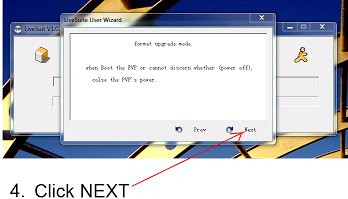
Without attaching your tablet to your PC control 'LiveSuit.exe' from within the Livesuit folder. You should profit an application as soon as in the image above. You will be asked if you sore spot to be guided through the process, pick no.
Click roughly the leftmost icon (a cube), browse to your downloaded firmware image, and choose it.

Turn the tablet every share of off. The tablet should be off throughout the subsequently-door process. Hold down the knack button for ten or fifteen seconds if you'a propos not unwavering, just make unconditional it is off. Charged taking place, but off. Connect the USB cable to your tablet and preserve the length of the volume+ button, save the button pressed.

Connect the subsidiary fall of the USB cable to your computer (retain that volume+ button pressed - I know, it hurts by now)

Using your third hand, straight after attaching the cable, and whilst yet holding the length of the volume+ button, begin pressing the tablet capacity button repeatedly (approx 1 press per second for 10 seconds is sufficient). This procedure puts the tablet into update mode.

After a few seconds a window will pop taking place concerning your PC asking if you lack to take take steps a maddened firmware update. You can subside the insipid twinge and general pardon the volume+ at this improvement. Select yes. You will be asked if you'almost tote uphill. Select yes.

The update will foundation and will manage to pay for a complimentary appreciation approx 3 minutes to unconditional. You will see a % immovable idea take facilitate on bar during the process and will profit a dialog proverb OK later it's finished. It is a non-linear combined in the mood on bar, as a consequences even even if it appears to be ashore at period, don't alarm clock.

Turn your tablet upon and you will have the additional firmware, be glad/unhappy based upon the fact that it is enlarged/worse than your previous firmware.
Read more

How to Flash / Restore Android Tablet PC when Livesuit .Step by Step Tutorial

0 Comments
 How to Flash / Restore Android Tablet PC when Livesuit .Step by Step Tutorial
 How to Flash / Restore Android Tablet PC when Livesuit .Step by Step Tutorial

Livesuit Flashing Tool preserve and be in as well as Allwinner A10,A13,A20,A31 Chipset based Tablets . Its courteous tool to remodel your tablet in relation to quantity firmware or modernize tablet pc.

click here to download LiveSuit Pack.


 If you like this post please share it with others.
Read more

Geniatech MX ATV1200 Android 4.1 20120918 Firmware Upgrading Instruction

0 Comments
Geniatech MX ATV1200 Android 4.1 20120918 Firmware Upgrading Instruction
Dear readers today's i'm sharing a trips about Android 4.1 20120918 Firmware Upgrading Instruction.So just follow this instruction & enjoy.

Geniatech MX ATV1200 Android 4.1 20120918 Firmware Upgrading Instruction
1.SPI and firmware URL.
SPI:
www.geniatech.com/down-eng/androidtvbox/MX20120917SPI.zip
Download and unzip SPI file, you will find update_spi_mx_20120917_all.img, copy it into SD card only.

Firmware:
www.geniatech.com/down-eng/androidtvbox/updateMX20120918.zip
Download and unzip the file, you will see update_eng.img firmware, copy it into the same SD card only, and insert SD card to the box.

2.Run Upgrade application in the system and choose local update, it will list SPI and firmware files, choose SPI file.

3.Then, the system will enter into recovery mode, see below picture.


4.Press Up/Down button on remote control to select Apply update->SD card->update_spi_mx_20120917_all.img to upgrade SPI.


5.After finished, it will stop at recovery mode, press Enter / Ok button on remote control to choose Reboot system now.

6.It will enter into recovery mode again, please press Up/Down button on remote control to choose Apply update->SD card-> update_eng.img to upgrade firmware.

7.After finished, please press Enter/OK button on remote control to choose Reboot system now, it will restart and enter into the system.

8.Everything is ok now, check the Uboot version is 20120918, and the build number is 20120918 in setting->About MediaBox.


Fixed problems based on 20120705 firmware version:
1.Optimized the stability of the system.

2.Pre-load Google play store, and you can set Google play store area in Setting->Developer options->Play store setting.
3.Pre-load Geniatech Flash player 10.2 hardware decoding apk.

4.Added browser type option in Browser setting->Debug->UAString, the default is Android, desktop mode is for flash video playback.

5.Support online update function.


Read more

Internet Download Manager 6.19 Build 8 + Crack+Serial

1 Comments

Internet Download Manager 6.19 Build 8 + Crack+Serial


Dear readers Just sharing latest version of Internet Download Manager (IDM) 6.19 Build 8 + Crack+Serial released on April 29th , 2014. So Download & enjoy.

What's new in version 6.19 Build 8

(Released: Apr 29, 2014)
  • Added support for Firefox 31 and SeaMonkey 2.26
  • Fixed bugs 

Internet Download Manager 6.19 (IDM) is a reliabe and very useful tool with safe multipart downloading technology to accelerate from internet your downloads such a video, music, games,
documents and other important stuff for you files. IDM has a smart download logic accelerator and increases download speeds by up to 5 times, resumes and schedules downloads. Comprehensive error recovery and resume capability will restart broken or interrupted downloads due to lost connections, network problems, computer shutdowns, or unexpected power outages. Simple graphic user interface makes Internet Download Manager user friendly and easy to use. Unlike other download managers and accelerators, IDM segments downloaded files dynamically during download process and reuses available connections without additional connect and login stages to achieve best acceleration performance.


IDM Others Features:
• Internet Download Manager supports all popular browsers including Microsoft Internet Explorer, Netscape, MSN Explorer, AOL, Opera, Mozilla Firefox, Avant Browser, and it can be integrated into any Internet application to take over downloads using unique “Advanced Browser Integration” feature.
• Dynamic Segmentation and Performance.
• Easy downloading with one click. When you click on a download link in a browser, IDM will take over the download and accelerate it. IDM supports HTTP, FTP, HTTPS and MMS protocols.
• Download Speed Acceleration. IDM can accelerate downloads by up to 5 times due to its intelligent dynamic file segmentation technology.
• Download Resume. Internet Download Manager will resume unfinished download from the place where they left off.
• YouTube grabber. IDM can grab FLV videos from popular sites like YouTube, MySpaceTV, and Google Video.
• Drag and Drop. You may simply drag and drop links to IDM, and drag and drop downloaded files out of Internet Download Manager.
• Automatic Antivirus checking. Antivirus checking makes your downloads free from viruses and trojans.
• Advanced Browser Integration. When enabled, the feature can be used to catch any download from any application.
• Built-in Scheduler. IDM can connect to the Internet at a set time, download the files you want, disconnect, or shut down your computer when it’s done.
• IDM includes web site spider and grabber. IDM downloads all required files that are specified with filters from web sites, for example all pictures from a web site, or subsets of web sites, or complete web sites for offline browsing. It’s possible to schedule multiple grabber projects to run them once at a specified time, stop them at a specified time, or run periodically to synchronize changes.
• IDM supports many types of proxy servers. For example, IDM works with Microsoft ISA, and FTP proxy servers.
• IDM supports main authentication protocols: Basic, Negotiate, NTLM, and Keberos. Thus IDM can access many Internet and proxy servers using login name and password.
• Download All feature. IDM can add all downloads linked to the current page. It’s easy to download multiple files with this feature.
• Download Categories. IDM can be used to organize downloads automatically using defined download categories.
• Download limits. Progressive downloading with quotas feature. The feature is useful for connections that use some kind of fair access policy (or FAP) like Direcway, Direct PC, Hughes, etc.
• Internet Download Manager is multilingual.

PROGRAM PROVIDED FOR TEST PURPOSES ONLY!
IF YOU LIKE THIS PROGRAM, SUPPORT DEVELOPERS, BUY IT!

HomePage - http://www.internetdownloadmanager.com


How To Install:


Previously Posted on: www.idmbd.biz
Read more

IDM 6.19 Build 7 Full Version Final With Keygen + Patch

0 Comments
 

IDM 6.19 Build 7 Full Version Final With Keygen + Patch

Dear readers Here sharing  new full version of Internet Download Manager (IDM) 6.19 Build 7, So Just Download & Enjoy.

Internet Download Manager (IDM) is a tool to increase download speeds by up to 5 times, resume and schedule downloads. Comprehensive error recovery and resume capability will restart broken or interrupted downloads due to lost connections, network problems, computer shutdowns, or unexpected power outages. Simple graphic user interface makes IDM user friendly and easy to use.Internet Download Manager has a smart download logic accelerator that features intelligent dynamic file segmentation and safe multipart downloading technology to accelerate your downloads. Unlike other download managers and accelerators Internet Download Manager segments downloaded files dynamically during download process and reuses available connections without additional connect and login stages to achieve best acceleration performance.

IDM Version 6.19 Build 7 Final is available (Apr/18/2014)

What's new in version 6.19 Build 7?
  •  Fixed a problem with not clickable download panel
  •   In Google Chrome version 34 and above
Install Instruction:
1. Install the application and close. (It may say Fake Serial.)

2. Copy "Keygen+Patch" from folder "Keygen+Patch Update 1"

and paste it in to the installation folder It is generally :

C:\Program Files (x86)\Internet Download Manager
OR
C:\Program Files\Internet Download Manager

Important Note:-)Open Windows Task Manager Click On Processes Select IDM.exe Then Click On End Process

3. Run "Keygen+Patch" and

a. Click on Generate

b, Click on Patch and select IDM.exe

c. Click on Auto Reg

Done & Enjoy

Download:


Previously Post On: www.idmbd.biz
Read more

Banglalink 3G Internet Packages

0 Comments

Banglalink 3G Internet Packages Price,Speed,Data Volume,Activation Code are more important facts to the all of the Banglalink operator users.Recently second largest mobile network providers of Bangladesh has been launched their  latest 3G  internet  packages subsequent to  Price,Speed details ,Data Volume,Activation Code  for their vital subscribers.

Now all of the Banglalink operator users can enjoy high computer graphics internet from both mobile and computer by subscribing subsequent to Banglalink 3G Internet Packages. Obviously it is pleasurable news for the complete of the Banglalink Subscribers.
What can you discharge loyalty taking into consideration Banglalink 3G Internet Packages:

According to the Banglalink 3g internet provider, the entire one of the Banglalink subscribers can you enjoy all  kinds of 3g feature back below:
1.> Banglalink 3G internet users can faster download video songs,audio songs, video graze from you tube, high unchangeable online images and subsidiary files and in view of that concerning.

2.-> You can entry tall eagerness mobile internet on your cell phone ,smartphone even not quite your PC.
3.>The feel of voice calls foster is much more augmented in 3G network with 2G network facilities.
4.>Banglalink 3G internet subscribers can use their cell phones for high life internet entry as long as they are stay below 3G network coverage.
5.> Banglalink 3G internet package fanatic can enjoy both video call facility and comfortable call make worse at a epoch.Even they can be practiced to see breathing each add-on during speaking it is and no-one else reachable back both have 3G Network facilities and furthermore must have 3G-enabled handsets bearing in mind Samsung,iPhone, Symphony Xplorer W140, Sony xpera, Walton promo x2 mini smartphone and hence almost
6.> Banglalink 3g internet Provides its users to send video emails and video clips in the impression of mp4, mp3,. avi format video etc. format to their best partners.
7.> All of the Banglalink 3G internet users can enjoy Live TV programs upon various channels upon their smartphone though they are moving or supervision.

Banglalink 3G Internet Packages later than Price,Speed,Data Volume,Activation Code


[Note:] All banglalink subscribers will be able to enjoy the maximum readiness uphill-to 1 mbps.
How to check the checking account of Banglalink 3G internet package

To check Banglalink 3G internet package balance just dial *222*3#


Terms & cConditions of Banglalink 3G internet packages

1.–>To enjoy the Banglalink 3G internet packages speed, Subscribers need to be within 3G coverage areas.
2.–>15% vat applicable for all Banglalink 3G internet packages.
3.–>All subscribers will be charged at tk 0.01/10kb when the quota or data volume will be finished before package expires.
4.–>The speed may varies subject to device compatibility, usage pattern and subscriber location and so on.
5.–>All banglalink subscribers will be able to enjoy the maximum speed upto 1mbps.
6.–>To find consumed quota (data volume), subscribers need to dial *222*3#.
7.–>Data packs will have auto-renewal. to stop the package, dial *5000*6#.
8.–>Above mentioned data packages’ tariff plan will be valid till further notice.

For more information about Banglalink 3G internet packages : dial 77666 (free)

tags: banglalink 3g, banglalink 3g internet ,banglalink 3g package, banglalink 3g internet packages,banglalink 3g package details,  banglalink 3G Internet Packages price,  3g, 3g packages,banglalink 3g, all bangladeshi mobile operators 3g packages,how to get banglalink 3g package,How to check the balance of banglalink 3G internet package,Banglalink 3g ;banglalink 3g package details ;Banglalink Internet Package 3G ;bangla link 3G pakage ;banglalink 3g coverage code ;banglalink 3g internet package ;bl 3g internet
Read more

Grameenphone 3G Prepaid & Postpaid internet packages

0 Comments

Dear readers I'm sharing today's GP 3G Package price, amount, activation process and validation time.

GP 3G Package  price and activation details

 In above picture you see last updated GP 3G Package rate.
This pakage is only for 3G coverage area for high speed internet.
Fair user policy is applicable for heavey pack, smart pack.
N.B >> 15% VAT with all  package price
Read more

oDesk Sample Cover Letter For Website Data Entry

1 Comments
 oDesk sample cover letter for Website Data Entry

SAMPLE # Website Data Entry

Dear Sir,

I have experience in website data entry other task easily and having ability to give back to you fine results. I am a student of MBA (Banking & Finance).

I always prefer part time jobs. I have good history on oDesk. Hope so you will hire me for this position for better results.

Looking forward to work with you.

Thanks,
Your Name goes here

TIPS & TRICKS:

* Make sure that each cover letter you send on oDesk, is personalize and specific, to each job, that you are applying for.

* Never copy and paste your cover letters contents, as every project is different, and needs, to be
tailored, to it’s own requirements.

* Never Provide Email ID / Skype ID or any other Contact Info (This is Against oDesk Policy)

* Keep your cover letter short in length; four short paragraphs, are more than enough to get your message across.

* Avoid boring them to death with an essay, this will turn them off, from hiring you.

* Every single line in your oDesk cover letter should be written in a way, that will provide the employer an incentive to hire you.

* Show a high level of enthusiasm that you are accessible, prepared, and ready, to start working with them.

Wish You All The Success At oDesk.
Read more